for host in /sys/class/scsi_host/*; do echo "- - -" | sudo tee $host/scan; ls /dev/sd* ; done
fdisk -l
fdisk /dev/[diskid]
mkfds.ext4 /dev/[diskid]
vim /etc/fstab ## add the mount path for /dev/[diskid]
umount [mountpoint]
growpart /dev/[diskid]
mount /dev/[diskid] [mountpoint]
DNS Cmdlets
To quickly add a dns entry to Microsoft DNS one can use the following cmdlet on the dns server:
dnscmd . /RecordAdd example.org server A 192.0.2.1
To quicly add a dns entry to a PowerDNS server one can use the following cmds on the dns server:
pdnsutil replace-rrset example.org server A 900 192.0.2.1
pdnsutil increase-serial example.org
pdns_control notify example.org
Ubuntu Virtual Machines on VMware and Multipathd syslog messages
Everynow and then you might install a Ubuntu or Debian machine and get multipath daemon pushed along the way.
Multipathd is used in environments where a disk may have one or more paths to it. Think of isci/fiber/SAN etc. If one path drops, it still might be available on the others.
However, in an environment with Virtual Disks this isn’t useful. And your syslog might get spammed with entries like the ones below, at least my syslog did.
multipathd[651]: sda: add missing path
multipathd[651]: sda: failed to get udev uid: Invalid argument
multipathd[651]: sda: failed to get sysfs uid: Invalid argument
multipathd[651]: sda: failed to get sgio uid: No such file or directory
multipathd[651]: sda: add missing path
multipathd[651]: sda: failed to get udev uid: Invalid argument
multipathd[651]: sda: failed to get sysfs uid: Invalid argument
multipathd[651]: sda: failed to get sgio uid: No such file or directory
There is a simple resolution to this issue.
Modify your multipath daemon config. Open the file /etc/multipath.conf in your favorite texteditor and ensure it looks like the following:
defaults {
user_friendly_names yes
}
blacklist {
device {
vendor "VMware"
product "Virtual disk"
}
}
Now restart your multipath-tools service
/etc/init.d/multipath-tools restart
Your syslog should get less messages that you can’t resolve anyway.
Other options are to turn Multipath complete off with the commands:
systemctl disable multipathd
systemctl stop multipathd
OR you can modify your virtual machine definition in VMware (esx or Workstation) by adding the following to the .vmx file:
disk.EnableUUID = "TRUE"
How to remove Microsoft Edge from a system level in Windows 10
The quick way would be:
- Navigate to C: Program Files (x86) Microsoft Edge Application
- Select the current version number
- Locate setup.exe
- Navigate to the file path within Command Prompt
- Execute the following command: setup.exe –uninstall –system-level –verbose-logging — force-uninstall
For the whole story read : https://www.express.co.uk/life-style/science-technology/1320416/Microsoft-Block-Windows-10-Users-Remove-Google-Chrome-Rival-Edge
Converting DIG output to JSON
DIG is one powerful tool, mostly used to troubleshoot DNS queries.
However, sometime we want to achieve a task in another field of expertise and collect dns data. For example when one needs to limit access to content which is hosted on different servers from time to time but we can’t utilize FQDN in our firewall rulebase because the reverse dns isn’t acurate.
Now with DIG we can collect the ip addresses that is returned from a DNS request. For example for google.com.
martijn@monitoring:~$ dig google.com ; <<>> DiG 9.9.5-9+deb8u17-Debian <<>> google.com ;; global options: +cmd ;; Got answer: ;; ->>HEADER<<- opcode: QUERY, status: NOERROR, id: 16736 ;; flags: qr rd ra; QUERY: 1, ANSWER: 1, AUTHORITY: 0, ADDITIONAL: 1 ;; OPT PSEUDOSECTION: ; EDNS: version: 0, flags:; udp: 4096 ;; QUESTION SECTION: ;google.com. IN A ;; ANSWER SECTION: google.com. 36 IN A 172.217.17.78 ;; Query time: 1 msec ;; SERVER: 195.8.195.8#53(195.8.195.8) ;; WHEN: Tue Mar 10 10:38:02 CET 2020 ;; MSG SIZE rcvd: 55 martijn@monitoring:~$
But manually scraping the default output and maintaining a list is time consuming. We can make the output cleaner by adding some additional parameters. For example the following command:
martijn@monitoring:~$ dig google.com +nocomments +noquestion +noauthority +noadditional +nostats ; <<>> DiG 9.9.5-9+deb8u17-Debian <<>> google.com +nocomments +noquestion +noauthority +noadditional +nostats ;; global options: +cmd google.com. 288 IN A 172.217.168.238 martijn@monitoring:~$
While this is already much cleaner, we still would have to manually process this output, or perform some screen scraping to continue with the output. We can however pipe the output of dig through the powerful awk command and skip the first three lines.
martijn@monitoring:~$ dig aaaa google.com +nocomments +noquestion +noauthority +noadditional +nostats | awk '{if (NR>3){print}}'
google.com. 53 IN AAAA 2a00:1450:400e:80d::200e
martijn@monitoring:~$
And to be honest, yes, we could skip the first three lines with any other tool that provides these capabilities, but awk seems to be generally available. Now we only have the actual results of the query it is safe to continue with the data.
DNS data always consists of a fixed structure.
Query TTL CLASS TYPE Content google.com. 53 IN AAAA 2a00:1450:400e:80d::200e
In my case i have a need to process this data in a structured way, and i am able to process either JSON or XML. for this example i will convert the structured data to JSON. Because the content is already by default separated by tabs we can pull the data through jq. However, we need to keep in mind that sometimes there are multiple tabs. So we need to squeeze them in to one.
martijn@monitoring:~$ dig aaaa google.com +nocomments +noquestion +noauthority +noadditional +nostats | awk '{if (NR>3){print}}' | tr -s '\t' | jq -R 'split("\t") |{Name:.[0],TTL:.[1],Class:.[2],Type:.[3],IpAddress:.[4]}'
{
"Name": "google.com.",
"TTL": "76",
"Class": "IN",
"Type": "AAAA",
"IpAddress": "2a00:1450:400e:80e::200e"
}
martijn@monitoring:~$
The output we have now seems to be valid JSON, however testing this further with dns queries returning multiple addresses will return slightly invalid JSON. An good example would be when we query the microsoft.com domain.
martijn@monitoring:~$ dig a microsoft.com +nocomments +noquestion +noauthority +noadditional +nostats | awk '{if (NR>3){print}}'| tr -s '\t' | jq -R 'split("\t")
|{Name:.[0],TTL:.[1],Class:.[2],Type:.[3],IpAddress:.[4]}'
{
"Name": "microsoft.com.",
"TTL": "3600",
"Class": "IN",
"Type": "A",
"IpAddress": "104.215.148.63"
}
{
"Name": "microsoft.com.",
"TTL": "3600",
"Class": "IN",
"Type": "A",
"IpAddress": "13.77.161.179"
}
{
"Name": "microsoft.com.",
"TTL": "3600",
"Class": "IN",
"Type": "A",
"IpAddress": "40.76.4.15"
}
{
"Name": "microsoft.com.",
"TTL": "3600",
"Class": "IN",
"Type": "A",
"IpAddress": "40.112.72.205"
}
{
"Name": "microsoft.com.",
"TTL": "3600",
"Class": "IN",
"Type": "A",
"IpAddress": "40.113.200.201"
}
martijn@monitoring:~$
As already stated, the output isn’t yet valid JSON, we need to slurp it once more through the jq tooling.
martijn@monitoring:~$ dig a microsoft.com +nocomments +noquestion +noauthority +noadditional +nostats | awk '{if (NR>3){print}}'| tr -s '\t' | jq -R 'split("\t") |{Name:.[0],TTL:.[1],Class:.[2],Type:.[3],IpAddress:.[4]}' | jq --slurp .
[
{
"Name": "microsoft.com.",
"TTL": "3256",
"Class": "IN",
"Type": "A",
"IpAddress": "104.215.148.63"
},
{
"Name": "microsoft.com.",
"TTL": "3256",
"Class": "IN",
"Type": "A",
"IpAddress": "13.77.161.179"
},
{
"Name": "microsoft.com.",
"TTL": "3256",
"Class": "IN",
"Type": "A",
"IpAddress": "40.76.4.15"
},
{
"Name": "microsoft.com.",
"TTL": "3256",
"Class": "IN",
"Type": "A",
"IpAddress": "40.112.72.205"
},
{
"Name": "microsoft.com.",
"TTL": "3256",
"Class": "IN",
"Type": "A",
"IpAddress": "40.113.200.201"
}
]
martijn@monitoring:~$
So, basically, to get the result of dig in an json valid output you could create one call in your bash script to
#!/bin/bash
recordtype="A"
fqdn="microsoft.com"
digjson=$( dig $recordtype $fqdn +nocomments +noquestion +noauthority +noadditional +nostats | awk '{if (NR>3){print}}'| tr -s '\t' | jq -R 'split("\t") |{Name:.[0],TTL:.[1],Class:.[2],Type:.[3],IpAddress:.[4]}' | jq --slurp . )
Feel free to query your own domainname or specific record and adjust the recordtype, preferably by setting the variables.
Installing PECL Extensions for PHP on a DirectAdmin server
It has been a while since i installed several PECL Extensions for PHP, especially on a DirectAdmin server, so i did some quick searches and came up with the following commands:
export PHP_VER=72
export PECL_EXTENSION=yaml
cd /usr/local/src
/usr/local/php${PHP_VER}/bin/pecl channel-update pecl.php.net
/usr/local/php${PHP_VER}/bin/pecl download ${PECL_EXTENSION}
tar zxf ${PECL_EXTENSION}-*.tgz && cd ${PECL_EXTENSION}-*/
/usr/local/php${PHP_VER}/bin/phpize
./configure --with-php-config=/usr/local/php${PHP_VER}/bin/php-config
make && make install
echo "extension=${PECL_EXTENSION}.so" >> /usr/local/php${PHP_VER}/lib/php.conf.d/90-custom.ini
systemctl restart httpd && systemctl restart php-fpm${PHP_VER}
unset PHP_VER
unset PECL_EXTENSION
First of all it is important to have all requirements installed for the PECL Extensions, if not the configure or the make command will fail.
Now let’s take a look at these commands line by line.
export PHP_VER=72
This will set an environment variable with the value “72”, this matches with the versioning that DirectAdmin and Custombuild use.
export PECL_EXTENSION=yaml
Setting another environment variable, this time with the PECL Extension name.
These two variables are referenced in the following commands, just to make them reusable.
cd /usr/local/src
This one, i really hope, should not need any explanation. We are changing directories…
/usr/local/php${PHP_VER}/bin/pecl channel-update pecl.php.net
We are executing the pecl command for the desired PHP instance and update the channel data. Just to make sure we are aware of the latest versions available.
/usr/local/php${PHP_VER}/bin/pecl download ${PECL_EXTENSION}
Let’s download the extension that we mentioned earlier in the environment variable.
It will be downloaded into /usr/local/src
tar zxf ${PECL_EXTENSION}-*.tgz && cd ${PECL_EXTENSION}-*/
Now the PECL extension has been downloaded, we can unpack it. Sometimes you see references with the ‘v’ option enabled for the tar command. I don’t think we need any verbose output while unpacking.
After unpacking immediately change directory towards the just extracted PECL extension.
/usr/local/php${PHP_VER}/bin/phpize
Now let’s prepare the extension with running phpize for the files in the current directory.
./configure --with-php-config=/usr/local/php${PHP_VER}/bin/php-config
Let us run the configuration and preparation scripts. Just be carefull and watch the output.
If anything fails, you haven’t met the requirements for the PECL Extension you are installing. You will have to solve them before continuing the commands.
make && make install
So the configure went successful and you executed the make and make install commands. The PECL Extension will be compiled against your system. And afterwards installed in the right directory for your DirectAdmin server and PHP version.
echo "extension=${PECL_EXTENSION}.so" >> /usr/local/php${PHP_VER}/lib/php.conf.d/90-custom.ini
This will insert a value at the end of the 90-custom.ini file in the PHP Configuration directory. It will tell PHP to load the just combiled and installed PECL Extension.
systemctl restart httpd && systemctl restart php-fpm${PHP_VER}
This will reload both httpd as your php-fpm services.
httpd is the default service name for your Apache service on a DirectAdmin server; also the default PHP installation method is PHP-FPM so hence we are restarting that aswell.
If you are however using Nginx or any other webserver you will have to restart that by hand now. The same applies if you are running PHP in a different way than PHP-FPM.
unset PHP_VER
unset PECL_EXTENSION
Finally we unset both environment variables. No need to maintain them as we are done.
You might want to have a look at the PHPINFO() output (or php -m) for the PECL Extension to be loaded.
Pursuing the Cisco Certified Network Professional Voice certification? Update your path!
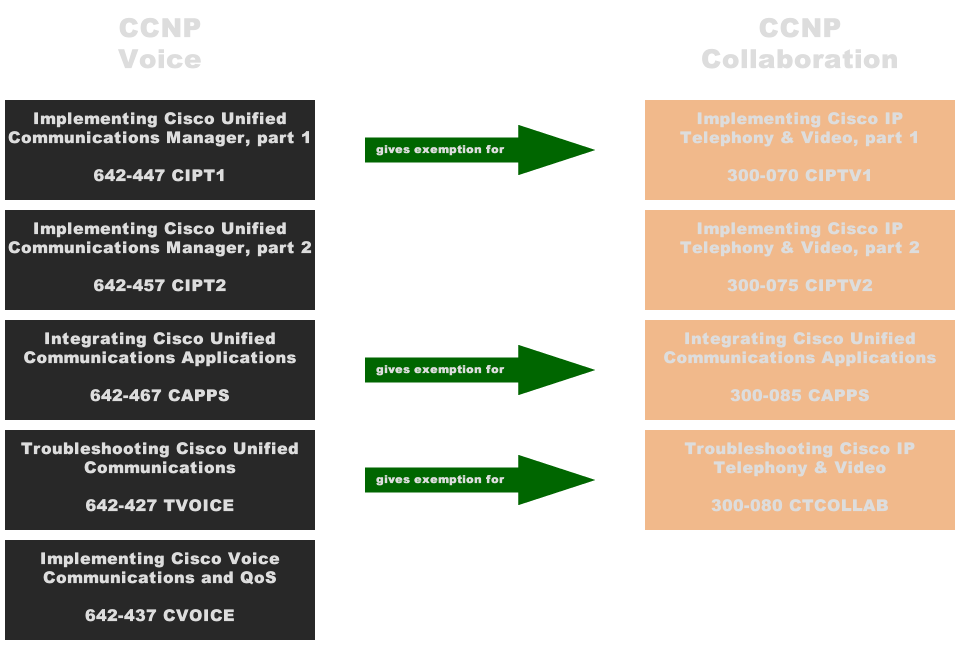
Whenever you are pursuing a Cisco Certified Network Professional certification in the Voice section, you should update your certification path. As of augusth 15th you will nolonger be able to obtain your CCNP Voice certification. Even if you still have to achieve your CCNP Voice, i would recommend you to update your certification path and obtain the brand new Cisco Certified Network Professional Collaboration certification.
The new CCNP Collaboration exam consist for a large part of the existing CCNP Voice materials, but has some updated exams on Video topics. Also it consists out of less exams to take. So on a financial base it would even save you money.
So what changed, for a beginning you are no longer required to take and pass the CVOICE exam. The CIPT1, CAPPS and TVOICE exams will give some eemptions for the new CCNP Collaboration certification. So if you already did one or more exams have a look at theĀ CCNP Collaboration Exam Migration Tool.
Have a look at the migration scheme.

If you are already CCNP Voice, take the new CIPTV2 exam and upgrade your certification to CCNP Collaboration.
Cisco’s Voice & Video certification becomes Collaboration
Recently i achieved my CCNA Voice certification, only a few days before Cisco announced it will be merging their CCNA Voice and CCNA Video into the new CCNA Collaboration.
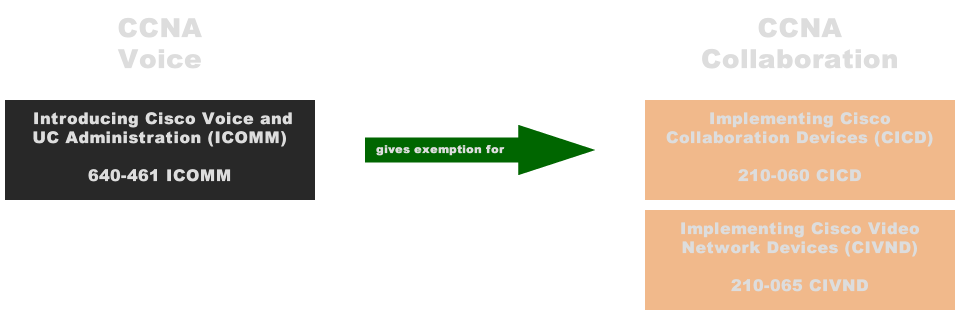
The new Collaboration certification consists out of two exams, basicly the old ICOMM and VIVND exams renumbered. That makes it easier to update your certification to the brand new Collaboration certification.
If you have only one of the two exams there is the CCNA Collaboration Exam Migration Tool.
This means for me, with only the ICOMM 640-461, i have to achieve the old VIVND (200-001) exam before august 15th or i can do the new CIVND (210-065) exam.
A new task has been created on my certification roadmap. Soon i also will explain what this means for the CCNP Voice i am/was pursuing…

CCNA Voice behaald
In december 2013, op de valreep van het jaar, schreef ik dat ik voor het einde van 2014 mijn CCNA Voice wilde behalen.
Die deadline heb ik door het werk niet gehaald, wel heb ik een maand later alsnog deze certificering behaald.
De volgende die ik na streef is mijn Design Associate degree. Inmiddels begonnen aan een video en audio introductie, vervolgens het boek doorwerken.
De pre-course assesment liet drie jaar geleden al een positieve start doorschemeren.
De assesment zal ik binnenkort nog eens doen om te kijken waar ik sta.
Een nieuw jaar, een nieuwe certificering?
We hebben nog een paar dagen te gaan in 2013 en dat houdt in dat de meeste mensen nadenken over wat ze in het nieuwe jaar willen bereiken.
Goede voornemens noemen we ze meestal, maar ook carriere paden worden regelmatig onder de loop genomen.
Zelf heb ik al een tijd geleden opgeschreven wat ik graag zou willen, maar ben daar niet geheel aan toe gekomen. Het studieboek en bijbehorende instructie dvd liggen bijvoorbeeld al 4 maanden in huis. Met de start van 2014 wil ik mij graag gaan focussen op het behalen van mijn CCNA Voice certificering. Het verlengd namelijk mijn CCNA dat ik begin 2012 heb behaald. Daarnaast komt het goed van pas in mijn werk.
Een deadline is ook gesteld, al is het maar om mijn CCNA niet te laten verlopen, eind 2014.
Ik weet dat CCNA een zware beproeving was door de breedheid van de materie. Naast CCIE examens schijnt dit een van de lastigste te zijn. CCNA Voice is daarentegen specifiek op spraak gericht. Echter dit is een oude en complexe materie waar veel verschillende implementatie mogelijkheden voor zijn. Of dit een makkelijke certificering gaat worden valt nog maar te bezien.