Let Spamassassin learn about not recognised spam

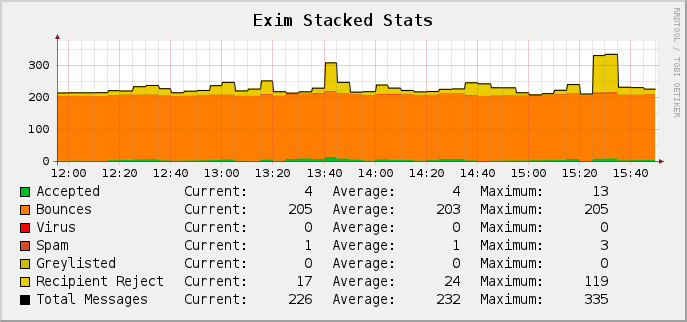
Below there is a chart of email processing on my server.

Exim stacked stats (graph)

Exim stacked stats for 19-11-2011@15:55

I process statistics every 5 minutes, So above image will tell you that i get about 4 real emails every 5 minutes. I have about 203 emails every 5 minutes that do not comply with email rules (invalid sender, SPF checks fail, etc) About 24 emails get rejected based on recipient rules (specific rules for one of my mailboxes).

And only 1 email every 5 minutes that would be accepted was recognised as spam. Considering the fact that i get multiple messages per day in my mailbox that should be considered as spam i decided that it is time to train spamassassin again.

Training SpamAssassin is quite easy aslong as you follow some rules and are willing to automate this task. As my server works with DirectAdmin I followed the Knowledge Base article on How to create a cronjob to use sa-learn to teach spamassassin – Maildir

Avaya technical update session for IP Office 500 release 8

Today i went to Avaya Netherlands for an update session given by one of the distributors we work with.

Heard some nice things about the new software version and of course the announcement of the additional CPU unit which can be used for centralized use of voicemail pro and the One-X portal.

Avaya ipo500 r8 software will be available in 2 days we are told.

Problems while opening PDF’s in Internet Explorer

Recently i was with a guy who had some problems opening the Adobe Acrobat PDF files in his browser, once in a while the PDF showed up blank and all subsequent files remained blank as well. Because the PDF was opened in his browser immediatly there was no way to download and examinate them.

The solution was to configuring the browser to open PDF files in an Acrobat window.

If you want the browser to open PDF files in a separate Acrobat window, then configure the browser to use Acrobat or Adobe Reader as a helper application. Then, when you select a PDF file in Internet Explorer, the browser opens the PDF file in an Acrobat window instead of the browser window.

To configure the browser to use Acrobat or Adobe Reader to open PDF files:

  1. Close your web browser.
  2. Start Acrobat or Adobe Reader.
  3. Choose Edit > Preferences.
  4. Select Internet in the list on the left.
  5. Deselect Display PDF in Browser, and click OK.
  6. Restart the browser

Note:The next time you select a link to a PDF file, the browser may prompt you to open or save the file. If you choose to open the file, then the browser opens the file in the helper application that you specified. If you choose to save the file, then the browser downloads the file to the hard disk.
Memorising the OSI-layers

Some people have problem with remembering the OSI-layers, for those who can not memorise them i have this small trick i learned once back in college.

Just keep in mind that all people seem to need data processing.
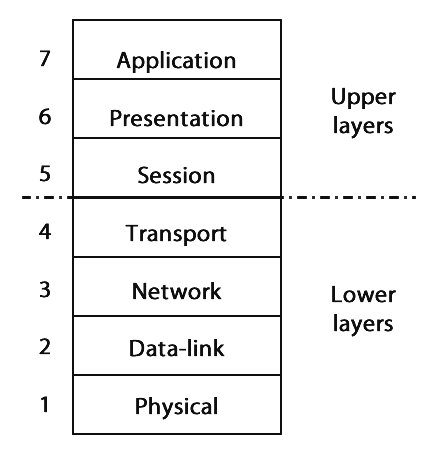
Where each word corresponds with one of the layers of the OSI model below.

OSI Layers

OSI Layers

So all corresponds with Application, people with Presentation etc.

I hope it will help you as it did for me!

Extending the library, books for #CCDA and #CCNP Voice (#Cisco)

While i was looking for some books for my Personal Education Program i found that CiscoPress and Pearson IT Certifications had each a useful eBook Deal of the Day.

With CiscoPress i bought the book Implementing Cisco Unified Communications Manager, Part 1 (CIPT1) Foundation Learning Guideicon for only $ 9.99. And at the Pearson IT Certification website i bought Designing for Cisco Internetwork Solutions (DESGN) Foundation Learning Guideicon.

The first book is for my CCDA track, the second for the CCNP Voice track that i pursue.

How to Remove/Disable Windows Search 4.0 from Windows XP

Last week i had a friend of me who insisted on keeping his pc with Windows XP instead of buying a newer one. After a fresh installation and installing of all updates and additional software he got stuck with the new and ‘improved’ Windows (Desktop) Search.

He said, everytime i do a search the bloody tools tells me it can’t find a file because it is just not looking where i want it to look. Can i disable it?

Ofcourse, just uninstall the update and it should be gone. Guess what?! It didn’t.

So after doing a bit of research i found out that you can just unregister this one dll that hooks up on your Windows Search in the registry, and it should give you back the original Windows Search.

Now how will you do that? Follow the steps below (on your own risk!)

  1. Click Start
  2. Click Run
  3. type: regsvr32 /u “%programfiles%\Windows Desktop Search\wdsShell.dll”  and hit ENTER.

This should tell you that the dynamic library is now unregistered. Hit the search and note the difference!

Automating external data import with Excel (2)

As i wrote earlier on my blog (and twitter) i would get back to this subject.

The task is quite simple. You have a Microsoft Excel sheet with a list of visits you did in a year. You did register each customer, and it’s zipcode, and complete address. Now your boss (or his secretary) asks you to deliver a sheet with kilometers travelled for your visits.

One can take a whole day (or more) to look them up with Google Maps, or you can use the data that you already have and automate this process with the Google Api’s. Continue reading

Dennis Ritchie Passes Away At Age 70 (Father Of C And UNIX)

Dennis Ritchie?! Who is Dennis Ritchie? Will be the first tought of many.

Dennis Ritchie is the inventor of the computer programming language C. In my eyes he has done even more work for the world than Steve Jobs did. (Sure he had a good eye for how things should look.)

Next to his job for creating the programming language C he was also known as one of the key-developers for UNIX. From those two positions he has had quite some influence on how todays Operating Systems look like and function.

Wired News: Dennis Ritchie: The Shoulders Steve Jobs Stood On
Los Angeles Times: Dennis Ritchie dies at 70; computer scientist helped develop Unix
New York Times: Dennis Ritchie, Trailblazer in Digital Era, Dies at 70